<!– SEO META Meta title: JBL 305P MkII Review: Big Sound on a Small Budget Meta description: An honest JBL 305P MkII review — the M2-derived waveguide, neutral sound, onboard EQ, that tweeter hiss, and why this 5-inch monitor still beats its price. NOTE: Set both external links below as DO-FOLLOW (do not add rel=”nofollow”). –>
JBL 305P Review: Big Sound on a Small Budget
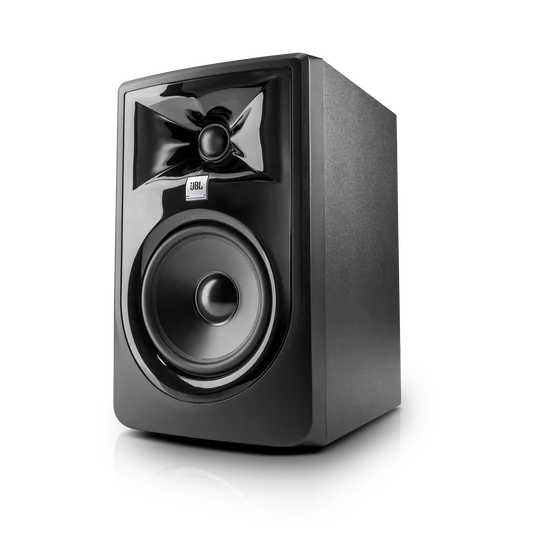
The JBL 305P is the most affordable monitor in JBL Professional’s recording lineup, and the second-generation update to the original LSR305 — the speaker that rewrote the rules for budget monitoring when it landed. The MkII keeps the same proven architecture but adds refined transducers, better low-frequency linearity, a faster top end, and a new Boundary EQ for awkward desk and wall placement.
The M2-Derived Waveguide Does the Heavy Lifting
The headline feature is the JBL Image Control Waveguide, a patented design that first appeared on JBL’s flagship M2 Master Reference Monitor. This isn’t marketing fluff — it’s the single biggest reason the JBL 305P MkII punches well above its price bracket.
The waveguide aligns the tweeter’s dispersion with the woofer at the 1,725 Hz crossover (4th-order Linkwitz-Riley). The payoff is a stereo image with real depth, clear layer separation, and a sweet spot far wider than anything else at this money. Move a foot off-axis on most budget monitors and the high end collapses. Here, the imaging holds together — which genuinely matters in untreated rooms and cramped desks, where you’re rarely sitting in the perfect spot.
How It Sounds
Tonally, the JBL 305P MkII is broadly neutral, with a touch of low-end fullness from the rear-firing Slip Stream port.
Mids and Highs
The mids are detailed and honest. Vocals sit where they should, and small details like reverb tails, sibilance and breath noise come through clearly. The top end is articulate without turning harsh, and the tweeter sidesteps the metallic, plasticky character you often get from cheap soft domes.
Bass
Bass is impressive for a 5-inch woofer, reaching cleanly down to around 49 Hz before rolling off. It’s not a sub replacement — kick-drum thump is there, but sub-bass below 45 Hz isn’t. For independent figures that back this up, Erin’s Audio Corner ran the speaker through a Klippel scanner.
Power and Headroom
The 82 W of bi-amped Class D power (41 W per driver) is well judged for a 5-inch box, delivering genuine headroom up to 108 dB peak SPL — plenty for nearfield work in any small to medium room. Volume scales cleanly, with no woofer compression or tweeter splash as you push it.
Living With It: The Real-World Niggles
The practical quirks are easy to live with.
The Tweeter Hiss
The most-discussed issue is a low-level tweeter hiss in a silent room with nothing playing. It’s a constant noise floor rather than intermittent buzzing, and it disappears the moment any signal plays. For mixing it’s a non-issue; for very quiet rooms at low monitoring levels, it’s just worth knowing about.
Placement and EQ
The rear port can build up the low end if you shove the monitors against a wall. The Boundary EQ helps a lot, with three settings (0 / -1.5 dB / -3 dB shelf at 50 Hz) that tame desk and wall placement. The 3-position HF Trim (±2 dB) adds another quick room-tuning tool.
Connectivity and Build
Connectivity is properly professional for the price: balanced XLR and balanced 1/4″ TRS inputs, with switchable +4 dBu / -10 dBV sensitivity. The cabinet is solid 15 mm MDF with a modern injection-moulded ABS baffle and a matte black finish. The glossy plastic picks up fingerprints during setup, so a quick wipe-down before positioning is worth it. At just under 5 kg each, they’re easy to place and reposition.
Who Should Buy the JBL 305P?
For a first set of monitors, a podcast or video-editing rig, or a project studio on a tight budget, the JBL 305P Mark 2 delivers properly professional monitoring at a price that almost feels like a mistake. The M2-derived waveguide, balanced connectivity, useful onboard EQ and 82 W of clean power make the JBL 305P one of the most consistently recommended monitors in the business. You can read the full rundown on the official JBL product page — but once you’ve heard the imaging, it’s obvious why this little monitor keeps topping the lists.
Wrapping Up
Years on from launch, the JBL 305P still sets the benchmark for what a budget monitor should do: honest tone, a wide sweet spot, and detail that lets you make real mixing decisions. The minor trade-offs — a faint tweeter hiss and a 5-inch driver’s natural limits down low — are easy to live with, and easy to forgive at this price. If you’re building a first studio or upgrading from consumer speakers, this is still one of the safest, smartest picks you can make.